


Video Lite
3.8191.00 Reviews
App Specs
- Version
- 4.0
- Updated On
- License
- Free
- Downloads
- 10,000,000+
- Developer
- Video Lite Ltd
- Categories
- Video Players & Editors
- Platform
- Android, iOS
Screenshots

 Analysis by AppCompare
When I’m choosing a video app, convenience matters, but so does being able to read the screen, control playback comfortably, and use it in the situations where I actually watch videos. Video Lite is a free video player and editor app from Video Lite Ltd, with an ad-blocking focus. It has a 3.6 average from around 13,000 ratings and over 5 million installs, so it has clearly found an audience, though that score also suggests the experience may not suit everyone equally.
Finding your way around the screen
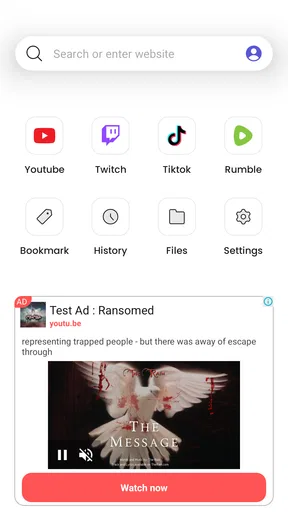
On first launch, the appeal is a direct route to video discovery rather than a complicated set of menus. The published experience described here centers on a home screen and search, which can be helpful if you want to get to a clip without first learning a large library of controls. I’d still take a moment to explore the interface before relying on it in a hurry: knowing where search and playback controls appear makes casual viewing less fiddly.
Clear, uncluttered navigation can reduce the effort of finding something to watch, but it does not automatically make an app comfortable for everyone. If you depend on larger text, a particular contrast level, screen-reader support, or a specific control layout, check how Video Lite behaves on your own device before making it your main player. Those needs vary, and the practical test is whether the actual screens and controls work for you.
Playback in different situations
Video Lite is most appealing when you want to search for a video and keep the viewing routine simple. A person who often watches short clips between errands may value fewer steps between opening an app and starting playback. Someone who prefers a familiar, all-in-one streaming service with a well-organized personal library may find a dedicated platform’s layout easier to predict.
Background audio and offline viewing can be useful in different ways, but they also change how you should plan. If you want to listen while doing chores, test background playback with the kind of video you use most. If you expect to watch without a connection, save what you need before leaving reliable Wi-Fi and check that the saved item is available to play. That small check is better than assuming every video will behave the same way offline.
Comfort, control, and practical limits
Video viewing is not only about what appears on screen. A long session can be tiring if you need to hold your phone in one position, repeatedly reach for small controls, or listen in a noisy place. Background playback may reduce the need to keep the display active, while offline access can help when mobile data is limited; neither replaces comfortable controls or audio that works in your surroundings.
There are also reasons to keep expectations measured. The app’s short store description focuses on blocking ads, but that alone does not tell me how every video source, ad, or playback session will behave. I would not choose it on the assumption that every interruption disappears. And if you need specialized captions, robust accessibility controls, or the predictable playback of a service you already use, compare those specific needs before switching.
Worth Reading Before You Choose

Flipboard Shows What News Apps Must Do Beyond the Feed

Switching to Android Auto Means Rethinking Your Driving Routine

Google Calendar Makes a Crowded Week Easier to Manage

Ludo King Makes the Most of the Minutes Between Plans

Baby Panda World Brings Quick Play to Modern Phones, but Its Game Library Feels Busy

ESPN’s Live Game View Makes Following Close Games Easier
Getting Started with Video Lite
First off, installing Video Lite was a breeze. I hopped onto the app store, hit download, and within moments, I was ready to dive in. The app welcomed me with a clean and intuitive interface. It's like they knew exactly what we, the users, want: simplicity.
Upon opening the app, you're greeted with a straightforward home screen. No clutter, no unnecessary distractions. Just a search bar waiting for you to type in whatever video your heart desires. If you're like me and prefer a no-fuss approach, this app is already ticking the right boxes.
Exploring the Features
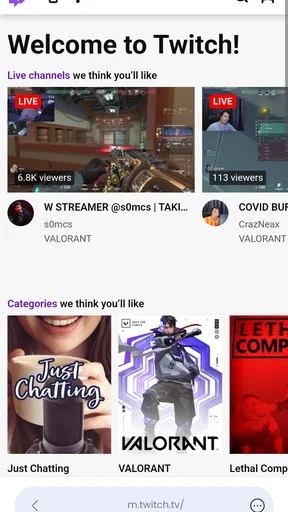
Let’s talk features because that’s where Video Lite truly shines. The app allows you to search for videos across multiple platforms. It's like having a universal remote for all your video needs. The search results are fast and relevant, which is a huge plus when you’re in the mood for some quick entertainment.
One of my favorite features is the offline mode. You can save videos straight to your device for those times when you’re off the grid or just trying to conserve data. It's perfect for long flights or road trips. Just download your playlist in advance and you’re good to go.
Another cool feature is the background play option. Ever wanted to listen to a video while doing other tasks on your phone? Well, this app has got your back. Just minimize the app, and the audio keeps playing. Multitasking has never been so seamless.
User Experience and Performance
Performance-wise, Video Lite is a champ. Videos load quickly, and I didn’t encounter any buffering issues. It’s like the app has some kind of magic wand that keeps everything running smoothly. The video quality is top-notch too; you’re not sacrificing clarity for speed here.
Navigation through the app is intuitive. Whether it’s searching for videos, managing downloads, or adjusting settings, everything is just a tap away. The developers clearly put a lot of thought into the user experience, and it shows.
Planning around your connection and routine
A useful way to judge offline viewing is to treat it as preparation, not a guarantee that every clip is ready whenever you are. Before a commute, I’d save the particular videos I expect to watch, then open the saved items while I still have a connection. This gives me a chance to catch a failed save or an item that does not play as expected before I’m sitting somewhere with weak reception.
The same practical approach applies to background audio. It suits a video that works as listening material, such as a talk or music-focused clip, better than something whose key information is visual. If you’re following demonstrations, subtitles, or on-screen steps, leaving the app may mean missing the part that matters. I’d use background play selectively rather than treating it as a universal replacement for watching.
Who benefits most—and who may prefer another player
I can see Video Lite working well for someone who wants a lightweight-feeling route to video search, sometimes listens with the screen out of the way, and values the option to prepare clips for offline moments. It may also be worth trying if ads interrupt your usual viewing and you want to see whether this app’s approach fits the sources you use. The app is free to install, though it includes in-app purchases ranging from under a dollar to around twenty dollars per item, so check any purchase prompt carefully rather than assuming every part of the experience is included at no cost.
For a person who mainly watches within one established streaming service, that service’s own app may be a better choice: its account features and familiar catalog structure can matter more than a separate search experience. Likewise, if you rely on a particular accessibility setting or need consistent captions, choose the player that demonstrably handles that need on your device. Video Lite is not automatically the right answer just because it combines several video-oriented conveniences.
A realistic test is a weekday trip across town. Before leaving home, I’d search for a clip I already know I want, save it while connected, and confirm it opens. On the journey, I’d try listening to an audio-led video with the screen minimized, then switch back to full viewing for anything that depends on visuals. That simple routine reveals whether its search, offline option, and background playback are useful to me without relying on assumptions about every source.
Age, version, and what to check first
The app is rated Teen, so it is not presented as a child-focused viewing space. I would not treat that rating as a substitute for checking what appears in search results or deciding whether the content is suitable for a younger person using the device. Search-based viewing can lead to a broad mix of material, making supervision and household expectations relevant.
Video Lite was released on December 30, 2023, and its current version is 3.5. It supports Android 6.0 and later, which gives owners of some older Android devices a reason to check compatibility rather than assuming they need a new phone. Before making it part of a daily routine, I’d confirm that the app installs on the device, that the controls feel manageable, and that the videos I care about are available in the way I expect.
Why You Should Consider Downloading Video Lite
If you’re a video junkie like me, Video Lite is a no-brainer. It’s a lightweight app that doesn’t hog your phone’s resources, yet it packs a punch with its features. The offline mode, background play, and easy navigation make it a must-have for anyone looking to enhance their video-watching routine.
Plus, the app is constantly updated, ensuring that you’re always getting the best possible experience. The developers listen to user feedback, which is evident in the app’s continuous improvements. It’s refreshing to see an app that’s not just a one-hit-wonder but is here to stay and thrive.
An inclusive choice depends on the individual setup
My inclusive verdict is conditional rather than universal. A simple search-first screen, the option to listen in the background, and offline preparation can make video access more flexible for people whose routines or environments make continuous on-screen viewing inconvenient. But those conveniences do not establish that the app supports every vision, hearing, motor, or cognitive need. The 3.6 average rating is a reminder to approach it as an option to test, not a guaranteed improvement for every viewer.
I’d give it a trial if your priorities are quick discovery and flexible listening, and I’d compare it with your usual player using the same video and the same device. Notice whether you can locate controls comfortably, follow content in your preferred way, and handle interruptions without frustration. If those checks go well, it may earn a place alongside your regular streaming apps; if they don’t, sticking with a more familiar or better-suited alternative is the sensible choice.
Wrapping it up, Video Lite is a gem in the app world. Whether you’re streaming the latest viral clip or revisiting an old favorite, this app makes it all feel effortless. Give it a try, and you might just find it becoming your go-to video app. Happy watching!
Pros
- User-friendly interface
- easy to navigate.
- Supports multiple video formats seamlessly.
- Fast download speeds for offline viewing.
- Ad-free experience enhances enjoyment.
- Lightweight app
- saves device storage.
Cons
- Limited editing features for videos.
- No support for 4K video downloads.
- Requires internet for initial setup.
- No option to create playlists in-app.
- Occasional crashes on older devices.
FAQs for Video Lite
What is Video Lite and what features does it offer?
Video Lite is a streamlined video player designed for both Android and iOS devices, providing users with a seamless video playback experience. It supports various video formats, offers high-definition playback, and includes features such as subtitle support, video speed control, and a user-friendly interface. With Video Lite, you can enjoy your favorite videos without unnecessary clutter or ads.
Is Video Lite free to use, or does it contain in-app purchases?
Video Lite is free to download and use, offering core functionalities at no cost. However, there may be optional in-app purchases available for users seeking additional features such as advanced playback options or ad-free experiences. These purchases are entirely optional and are aimed at enhancing the user experience.
How does Video Lite ensure smooth video playback on mobile devices?
Video Lite is optimized for performance, ensuring smooth playback even on devices with limited resources. It uses efficient coding to reduce buffering and supports hardware acceleration for enhanced video processing. Whether you are watching high-definition content or streaming online, Video Lite provides a reliable playback experience.
Does Video Lite support offline video viewing?
Yes, Video Lite supports offline video viewing. Users can download videos onto their devices and access them without an internet connection. This feature is particularly useful for users who want to watch videos on the go, such as during travel or in areas with unreliable internet access.
Is Video Lite compatible with all video formats?
Video Lite supports a wide range of video formats, including MP4, AVI, MKV, and more. Its versatility makes it compatible with most video files, eliminating the need for additional converters or software. Whether you are streaming or viewing downloaded content, Video Lite ensures compatibility across various formats.


